
If you have ever spent hours trying to debug a flaky web application test or wrestled with complex testing frameworks, you know how painful End-to-End (E2E) testing can be. Enter Cypress, a modern front-end testing tool built for anything that runs in a browser.
Whether you are a developer looking to ensure your code works before deployment or a QA engineer seeking a more reliable automated testing framework, Cypress is designed to make the process smooth and fast.
In this post, we’ll look at where Cypress came from, what makes it unique, and how to get your first test running in under five minutes.
The Origin: Why Was Cypress Created?
To understand why Cypress is so popular today, we have to look at what came before it. For over a decade, Selenium was the undisputed king of web automation.
While Selenium was revolutionary, it was built in an era when the web consisted of static HTML pages. As modern JavaScript frameworks like React, Vue, and Angular took over, websites became dynamic, asynchronous apps. Testing these modern apps with older tools meant dealing with constant timing issues, slow execution speeds, and "flaky" tests that failed randomly.
In 2014, developer Brian Mann set out to fix this broken developer experience. He realized that the only way to truly solve the timing and reliability issues of modern web testing was to completely change where the test code executes. He founded Cypress.io to build a tool that lives natively inside the browser alongside your application code.
What is Cypress?
Cypress is an open-source, JavaScript-based End-to-End testing framework. It allows you to write, run, and debug tests for web applications directly in the browser.
Unlike older testing tools that run outside the browser and execute commands over a remote network connection, Cypress operates inside the same run loop as your application.
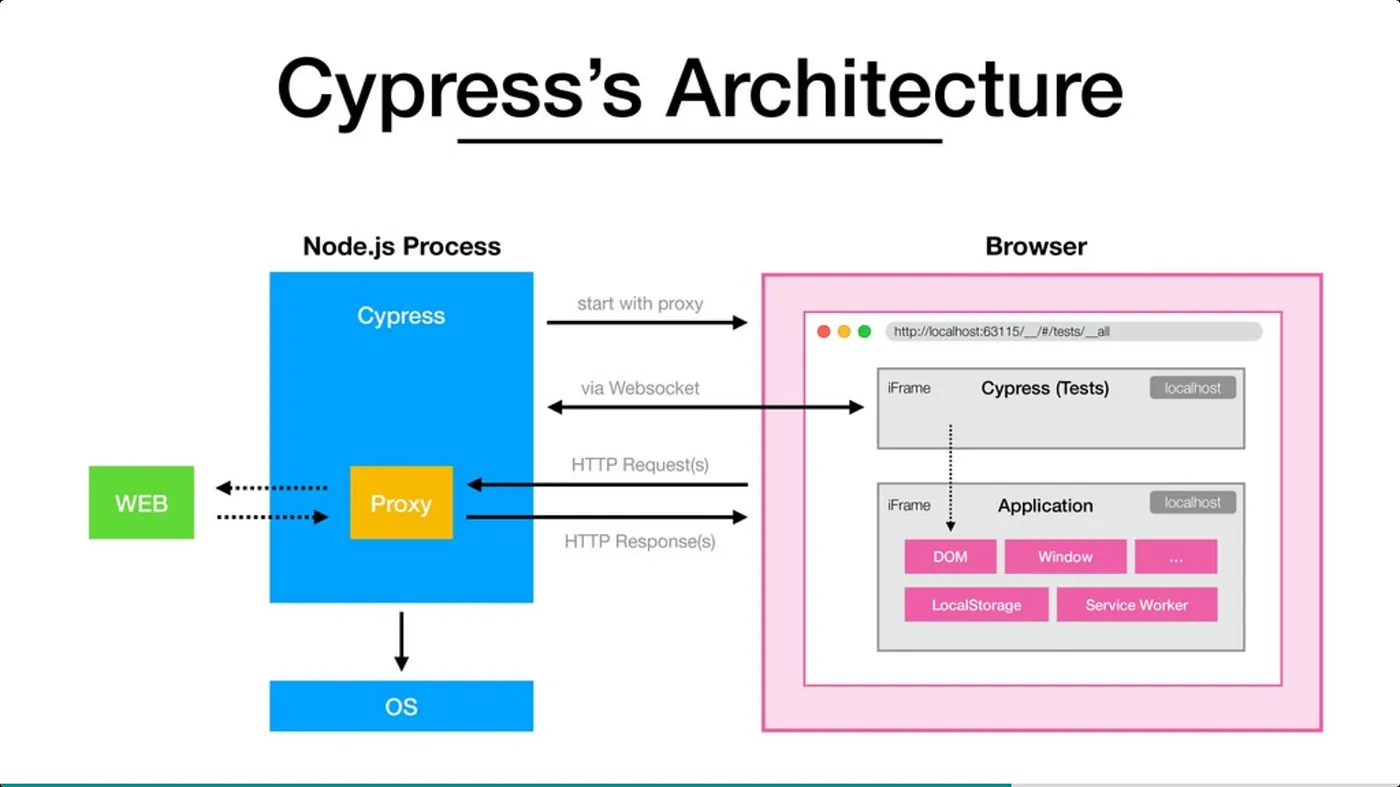
As shown in the architecture layout, Cypress splits its work: a Node.js process handles system-level tasks like setting up network proxies, while your actual test code runs side-by-side with your application inside the browser window. This unique setup gives Cypress incredible advantages:
- Real-time Reloads: The moment you save a test file, Cypress automatically reloads and reruns the test in real time.
- Time Travel Debugging: Cypress takes snapshots of your application as your tests run. You can literally hover over commands in the test runner to see exactly what your app looked like at that specific moment.
- Automatic Waiting: You don't need to add manual "sleep" or "wait" commands. Cypress automatically waits for elements to appear, animations to finish, and network requests to complete before moving to the next step.
- Spies, Stubs, and Clocks: You can easily control and verify the behavior of functions, server responses, or timers.
The Basic Setup Guide
Getting Cypress up and running in a web project is incredibly straightforward. You only need a computer with Node.js installed.
Here is the exact step-by-step sequence to get Cypress running in a new or existing project directory.
Initialize your project
Skip if you already have a package.json
Open your terminal, navigate to your project folder, and create a standard Node project file by running:
Bash

npm init -y
npm init -y
Install the Cypress package locally as a development dependency using npm:
Bash

npm install cypress --save-dev
npm install cypress --save-dev
Launch the Cypress Launchpad
Opens the interactive GUI
Once installation finishes, fire up the Cypress interactive app with this command:
Bash
npx cypress open
npx cypress open
The Cypress app will open on your desktop. Select E2E Testing. Cypress will automatically generate all the necessary configuration files and folders (cypress.config.js and a cypress/ directory) inside your project root. Click Continue.
Pick your preferred browser (like Chrome or Electron) from the screen and click **Start E2E Testing**. From there, select **Create new spec**, name your file first_test.cy.js, and click create!Writing Your Very First Test
Cypress uses a syntax that is highly readable, combining elements of popular testing libraries like Mocha and Chai. Here is what your newly created first_test.cy.js file looks like:
describe('My First Web Test', () => {
  it('Visits a website and checks the content', () => {
    // 1. Visit a live URL
    cy.visit('https://example.cypress.io')

    // 2. Find an element by its content and click it
    cy.contains('type').click()

    // 3. Make an assertion about the new URL page state
    cy.url().should('include', '/commands/actions')
  })
})
When you click on this spec file inside the Cypress desktop app, you will watch the browser launch, navigate to the site, click the button, and mark the test as passed in a fraction of a second.
Wrapping Up
Cypress removes the complexity and frustration historically associated with web automation. By running natively inside the browser, it delivers reliable, fast, and highly debuggable testing environments for modern developers.
If you are building apps for the modern web, adding Cypress to your workflow ensures that your users always get the experience you intended.